Installing the Edge Explorer 2 Service Pack installer
Important! The Edge Explorer 2 API must be installed before performing this procedure.
Use the following procedure to install the Edge Explorer 2 installer:
-
From the Service Pack folder, select the IEE 10.3.2 Cumulative Service Pack installation package, right-click and select Download.
-
Double-click IEE_10.3.2.exe to open the file. This will start the extraction process for the contents of the installer. This may take several minutes.
-
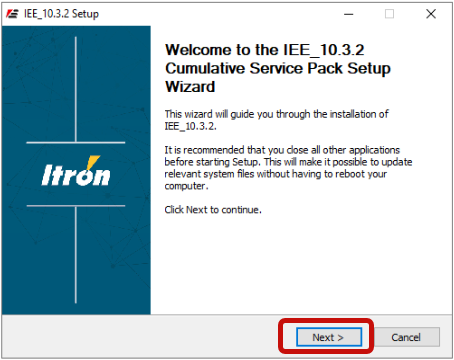
When the extraction process has completed, the IEE 10.3.2 Setup Wizard will appear. Click Next.
-
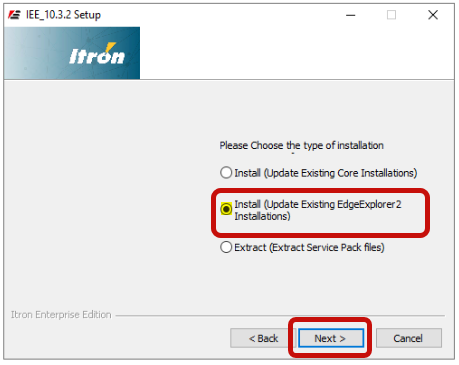
Select Install (Update Existing EdgeExplorer2 Installations) and click Next.
Important! The Edge Explorer 2 API must be installed before selecting the Install (Update Existing EdgeExplorer2 Installations) option.
-
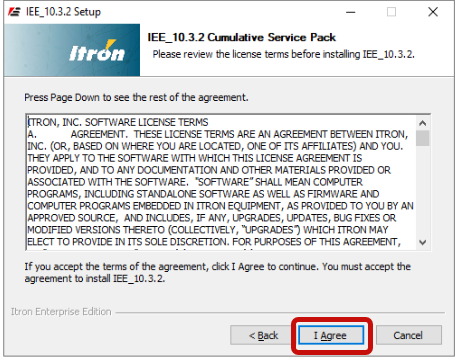
Select I Agree to accept the license agreement.
-
Click Browse to select the install location, and then click Install.
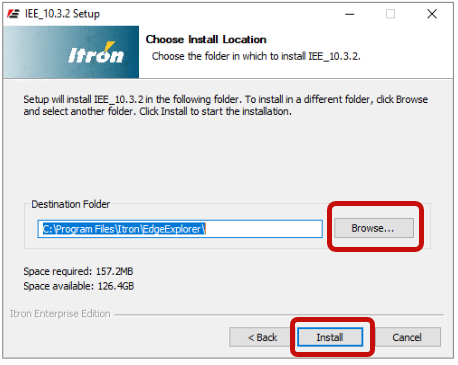
-
A status bar displays the installation progress. When the installation has completed, click Close.
Note: You may need to restart the IIS service for the changes to take effect.
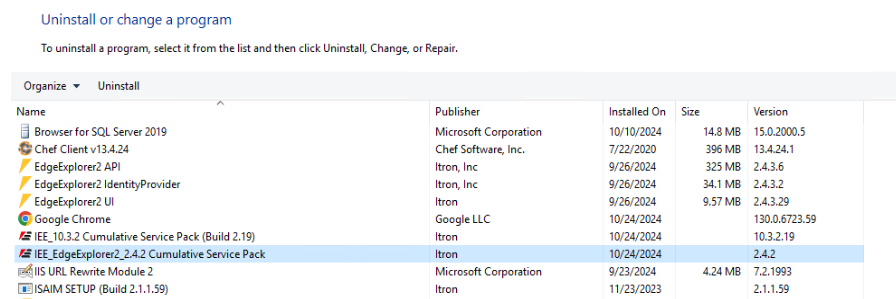
Tip: You can access the Service Pack installer under Program and Features on your device.